

Every month I do the same thing: my phone has 30 receipt screenshots, my email has a dozen PDF invoices, and the accountant wants them grouped by month with a total at the bottom. I rename files until I get bored, then dump everything into one folder called receipts-mess. A skill fixes that specific chore, and it takes less time to write than one month of renaming.
What a skill is, plainly
A skill is a folder with a Markdown file inside. The folder name becomes the command you type. The file is always called SKILL.md and holds two parts: a few lines of YAML at the top saying what the skill is for, then the instructions underneath. No plugin format, no JSON schema, no build step.
Anthropic introduced this format in October 2025. Since then OpenAI's docs tell developers to "use agent skills to extend ChatGPT and Codex", and Google shipped Skills across Workspace from 5 October 2026 and in the Gemini app from 13 October. That is why skill started showing up in search boxes everywhere.
Only the description is loaded while you chat. The body loads when the skill gets used, and a script or reference file is read only when the instructions point at it. Anthropic calls this progressive disclosure. In practice you can keep a detailed checklist on disk and pay almost nothing for it on every ordinary message.
Where the file goes
| Where | Path | Who gets it |
|---|---|---|
| Personal | ~/.claude/skills/<name>/SKILL.md | every project on this machine |
| Project | .claude/skills/<name>/SKILL.md | anyone working in the repo |
| Plugin | <plugin>/skills/<name>/SKILL.md | wherever the plugin is enabled |
For a first skill, use the personal path. Create the folder, drop SKILL.md inside, and restart the session if the file was already there when you opened it. Then type /receipt-sorter to call it by hand, or describe the chore in plain words and let the description pull it in.
Build a receipt sorter
The job is narrow on purpose: take a folder of receipts with whatever names the phone or bank app produced, group them into year and month folders, rename them to date_merchant_amount, and write one CSV the accountant can open. Parsing names is boring, which makes it a good skill. The instructions decide; the script types.
The SKILL.md file
Save this as ~/.claude/skills/receipt-sorter/SKILL.md
---
name: receipt-sorter
description: Sorts a folder of receipt photos and PDFs into year/month folders and writes an index.csv. Use when the user says their receipts are a mess, asks to tidy claim/reimbursement photos, or wants a spending index before filing taxes.
when_to_use: Trigger phrases such as "sort my receipts", "tidy up my invoices", "I need a claim sheet", "group these receipts by month".
allowed-tools: Bash(python ${CLAUDE_SKILL_DIR}/scripts/sort_receipts.py *)
---

# Receipt sorter

## What this does

Turns `receipts/` full of names like `IMG_4412.jpg` into:

```
sorted/
  2026/
    10/
      2026-10-03_grab-ride_12.40.jpg
```

and writes `sorted/index.csv` with one row per receipt.

## How to run it

1. Ask the user for the folder that holds the receipts. If they do not name one, use `receipts/` in the current directory.
2. Preview first. This changes nothing on disk:

   `python ${CLAUDE_SKILL_DIR}/scripts/sort_receipts.py <folder>`

3. Show the preview table to the user. If they say go ahead, run it again with `--apply`.
4. Report how many files moved and where `index.csv` landed.

## Rules the script follows

- Date comes from the filename when it looks like `2026-10-03`. Otherwise it falls back to the file's modified time.
- Merchant is the words left after removing the date, the amount and camera noise such as `IMG_` or `screenshot`.
- Amount is the last number with a decimal point.
- Files are copied, not deleted. The original folder stays untouched.

## Do not

- Do not delete originals to "clean up" before the user confirms the index looks right.
- Do not guess a merchant when the filename has none; write `unknown` instead.scripts/sort_receipts.py, the whole thing
Save next to SKILL.md, inside a scripts folder
# -*- coding: utf-8 -*-
"""Sort receipts into YYYY/MM folders and write index.csv.

Usage:
    python sort_receipts.py <folder>          # preview only
    python sort_receipts.py <folder> --apply   # copy + write index
"""
import csv
import io
import os
import re
import shutil
import sys
from datetime import datetime

DATE_RE = re.compile(r"(20\d{2})[-_\.](\d{2})[-_\.](\d{2})")
AMOUNT_RE = re.compile(r"(\d+\.\d{1,2})")
NOISE = ("img_", "image", "screenshot", "photo", "scan", "whatsapp")
EXTS = {".jpg", ".jpeg", ".png", ".pdf", ".heic", ".webp"}


def parse(name, mtime):
    stem = os.path.splitext(name)[0]
    m = DATE_RE.search(stem)
    if m:
        date = datetime(int(m.group(1)), int(m.group(2)), int(m.group(3)))
        rest = stem[: m.start()] + " " + stem[m.end():]
    else:
        date = datetime.fromtimestamp(mtime)
        rest = stem

    amounts = AMOUNT_RE.findall(rest)
    amount = amounts[-1] if amounts else ""
    if amount:
        rest = rest.replace(amount, " ")

    words = re.sub(r"[^A-Za-z0-9]+", " ", rest).strip().lower()
    keep = [w for w in words.split()
            if w and not w.isdigit() and not any(n in w for n in NOISE)]
    merchant = "-".join(keep) or "unknown"
    return date, merchant, amount


def slug(text):
    return re.sub(r"[^a-z0-9\-]+", "-", text.lower()).strip("-")


def main():
    args = [a for a in sys.argv[1:] if not a.startswith("--")]
    apply = "--apply" in sys.argv
    folder = args[0] if args else "receipts"
    if not os.path.isdir(folder):
        print("No folder at", folder)
        return 1

    files = sorted(f for f in os.listdir(folder) if os.path.splitext(f)[1].lower() in EXTS)
    out_root = os.path.join(folder, "sorted")
    rows = []

    for name in files:
        path = os.path.join(folder, name)
        date, merchant, amount = parse(name, os.path.getmtime(path))
        ext = os.path.splitext(name)[1].lower()
        tail = f"{merchant}_{amount}" if amount else merchant
        new_name = f"{date:%Y-%m-%d}_{slug(tail)}{ext}"
        rel = os.path.join(f"{date:%Y}", f"{date:%m}", new_name)
        rows.append({
            "date": date.strftime("%Y-%m-%d"),
            "month": date.strftime("%Y-%m"),
            "merchant": merchant,
            "amount": amount,
            "original": name,
            "new_path": rel.replace("\\", "/"),
        })
        if apply:
            dest = os.path.join(out_root, rel)
            os.makedirs(os.path.dirname(dest), exist_ok=True)
            shutil.copy2(path, dest)

    print(f"{'MODE':<5} {'FILES':>5}  {folder}")
    print("apply" if apply else "dry", f"{len(rows):>5}")
    print()
    print(f"{'DATE':<12}{'MERCHANT':<18}{'AMOUNT':>8}  NEW PATH")
    print("-" * 78)
    for r in rows:
        print(f"{r['date']:<12}{r['merchant']:<18}{r['amount']:>8}  {r['new_path']}")

    total = sum(float(r["amount"]) for r in rows if r["amount"])
    print("-" * 78)
    print(f"total: {total:.2f} across {len(rows)} receipts")

    if apply:
        os.makedirs(out_root, exist_ok=True)
        idx = os.path.join(out_root, "index.csv")
        with io.open(idx, "w", encoding="utf-8", newline="") as f:
            w = csv.DictWriter(f, fieldnames=["date", "month", "merchant", "amount", "original", "new_path"])
            w.writeheader()
            w.writerows(rows)
        print()
        print("index written:", idx)
    return 0


if __name__ == "__main__":
sys.exit(main())The two commands we ran
Preview first, then apply
python scripts/sort_receipts.py sample-receipts
python scripts/sort_receipts.py sample-receipts --applyWhat happened when we ran it
I built the skill on this machine and ran it on 8 receipts from my own download folder, with names like IMG_4412.jpg and screenshot 2026-11-18 parking 3.00.png. Eight files, one dry run, then --apply. It created 2026/10 and 2026/11, copied every file under a readable name, and wrote index.csv. The total came to 296.50.
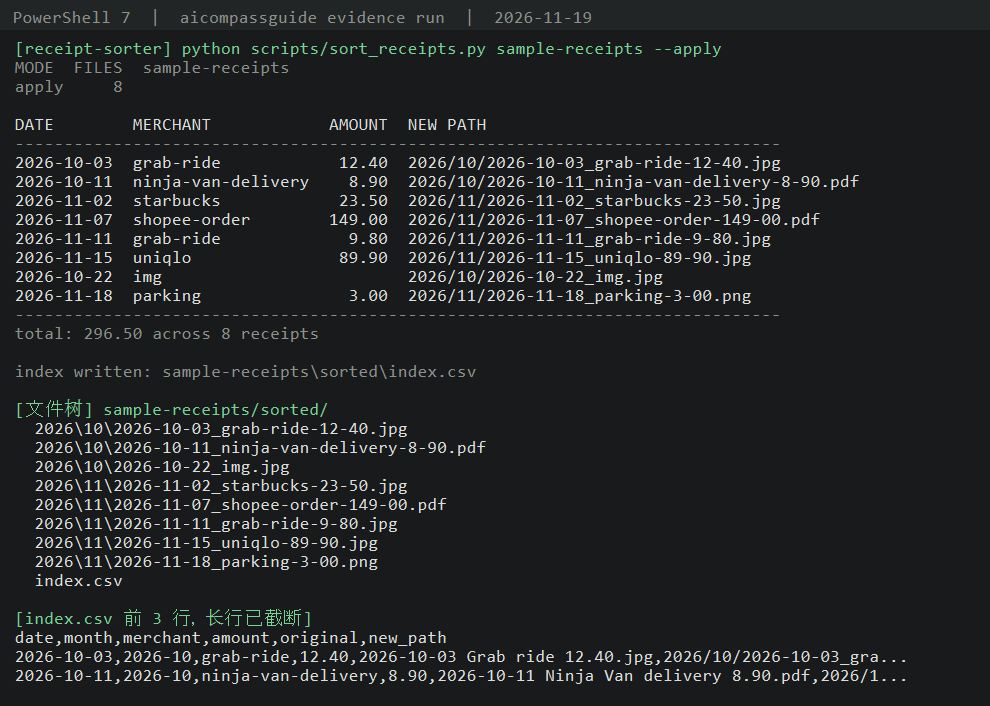
One file showed where the rule was weak. IMG_4412.jpg had no date in its name and no vendor, so the first version labelled it img-4412 and left the amount empty. I tightened the parser to drop bare numbers and camera prefixes, ran it again, and it came out as img with a blank amount. Not perfect, but the file kept its own date and landed in the right month. Fixing a skill means editing one sentence in the instructions or one line in the script, not retraining anything.
The accountant side is the part that pays off. index.csv has six columns: date, month, merchant, amount, original file name, new path. Last month I spent about twenty minutes renaming files; this run finished before I could alt-tab.
Three more that take ten minutes
| Skill | What you say | What comes back |
|---|---|---|
| weekly-report | /weekly-report with your rough notes | the five sections your manager reads, in the same order every week |
| photo-rename | point it at a folder of trip photos | files named by date and place, duplicates listed separately |
| inbox-triage | paste a day of email subjects | three stacks: reply today, read later, ignore |
Each of these is a SKILL.md with a short instruction block. The weekly-report one can be pure text; the other two want a small script, like the receipt sorter.
Where it breaks
- A description that never names the trigger. Claude decides from that line whether to load the skill at all.
- A SKILL.md past 500 lines. Anthropic's guidance is to keep the file under 500 lines and move detail into a separate reference file.
- Scripts with dependencies you did not declare. The skill works on your laptop and fails on a colleague's machine.
- Side effects without a gate. Anything that deletes, sends or deploys belongs behind disable-model-invocation: true, so it only runs when you type the command.
- Skills from strangers. A skill can run shell commands and read your files, so treat a downloaded skill the way you treat a script someone emailed you: read the SKILL.md and the scripts before running it.
- API keys written into the file. Anything in SKILL.md travels with the folder when you share it.
The cost question
Writing a skill costs nothing. Using one costs tokens: the description sits in context on every message, and invoking it loads the body plus whatever work follows. A 60-line skill is cheaper than a long reference document. A skill that reads a 2,000-row CSV costs more than one that reads ten lines.
The demand is not subtle. DataForSEO figures cited by FindSkill put "claude skills" at a peak of 90,500 US searches in March 2026, and "agent skills" at 5,400 a month by August 2026, up from 70 a year earlier. The public marketplace skills.sh listed 2,179 skills on 16 January 2026 and 40,285 on 5 February, twenty days later.
Start with the chore you repeat every week. If you already save custom instructions as Gemini Gems, the same idea is moving there under the skill name, and our Gemini Gems article covers that migration.
Official Websites (Avoid Phishing)
Fake and phishing sites often rank high in search results. Only use the official URLs below.