

Picture this: you want to buy a family car, and you wish you could hand ChatGPT one question and come back an hour later to a report that compared a dozen models across real reviews. Or you want your own little assistant that already knows your writing style and spits out Xiaohongshu posts on command. Or you just want a tiny script to batch-compress all the photos in a folder. None of this is an 'ask one clever question' trick. These are the deeper ChatGPT moves. You already know how to chat; today you'll learn how to actually use it, and everything below is something you can try tonight.
What 'going deeper' actually means
Most people use ChatGPT exactly the way they'd ask a friend: one question, one answer, done. That's fine, but it leaves most of the tool on the table. The advanced side has four parts: letting it research for you, building a helper that knows your rules, having it write small tools, and asking better questions. We'll take them one at a time, and each one comes with something you can copy-paste.
1. Deep Research: hand it a question, get back a sourced report
Deep Research is exactly what it sounds like. Instead of guessing from memory, you give it a real question and it quietly opens dozens of web pages (reviews, spec sheets, forum threads, news), reads them, and writes you a report with the sources attached. Think of it as an intern who does the Googling so you don't have to.
Compare three family SUVs you can actually buy in 2026 on safety and resale value, with sources. For each car list: crash-test results, the most common owner complaints, and the 3-year resale value. End with one recommendation for a family with two kids and explain why. Put a source link after every key number.
Where it shines: anything that normally means an evening of open tabs (buying a car, comparing insurance, picking a school, choosing between two job offers). One honest note: Deep Research is a paid feature. It launched on the highest tier and later opened up to mid-tier plans, and how many tasks per month you get depends on your plan. The exact limits change often, so check the official site for what your account shows. The rest of this article's tricks work in ordinary chats.

2. Custom GPT: a bot stuffed with your rules and your files
A Custom GPT is just a normal ChatGPT conversation that you've permanently given a job description and a reference shelf. Instead of re-explaining 'I write for Chinese working women who hate finance jargon' every single time, you say it once, build the bot, and it just remembers. Four steps:
- Open the GPT builder (usually via 'Explore' or your avatar menu) and choose to create a new GPT.
- Give it a name and write its instructions. For a Xiaohongshu copy assistant, paste this: 'You are a Xiaohongshu copywriting assistant. My readers are 25–35 year-old office workers who want to start managing money but know nothing about it. Every time I give you a product or topic: write a title under 20 characters with an emoji; write the body in 3–4 short, chatty paragraphs like talking to a friend; end with one clear action; never use words like get-rich-quick.'
- Optionally upload reference files (your past posts, a brand style doc, product FAQs) so it writes in your voice.
- Save it and choose who can use it: just yourself, a link you share, or the public store.
One important heads-up as of late 2026: OpenAI has tightened who can build new GPTs. Personal accounts (Free, Go, Plus, Pro) may currently only use existing or shared GPTs, while creating and publishing new ones has moved mainly into Business / Enterprise team workspaces. If you don't see the 'create a GPT' button, that's likely why. You can still build the habit by saving your best instructions and pasting them at the top of every chat instead. Exact rules change, so confirm on the official site.
3. Codex: let ChatGPT write small tools: no coding degree needed
Codex is OpenAI's built-in coding mode. For a non-programmer, that just means: instead of asking ChatGPT to explain something, you ask it to actually make a small working tool for you. You don't read the code. You read what it told you it does, then you run it.
Write me a small Python script. I give it a folder path, it finds every .jpg and .png inside, and it compresses each image to under 200KB without making it look blurry. Never touch my original files: save the compressed copies in a new subfolder called 'compressed'. Add comments in plain language so I can follow each step. Tell me exactly how to run it.
The one rule that matters: if you don't understand the code, copy the folder to a backup before you run anything. AI-written scripts are usually right and occasionally destructive. The backup costs ten seconds and saves a disaster. Codex itself lives on paid plans, but you can get the same 'write me a script' result in a normal chat and then ask it, step by step, how to run it.

4. Four prompt upgrades that take ten seconds
- The four-element formula: role + task + format + constraints. Say who it is, what to do, how to output it, and what to avoid. Answers get dramatically more on-target.
- Chain it instead of one-shotting it: 'First give me an outline, then after I approve, write section by section.' You steer instead of gambling on one long answer.
- Show it a sample: paste one example of the output style you want, then say 'write three more like this'. People call this few-shot, but it just means showing it a sample.
- Make it check itself: after any answer that matters, add 'Now check the above for errors or made-up facts and tell me what you found.'
Role: you are an insurance advisor with 10 years of experience. Task: explain whether critical illness cover or term life insurance fits a family that just had a baby. Format: start with a plain-language conclusion under 100 words, then a short table with three key differences. Constraints: no jargon. Explain every term you have to use in one sentence.
The fifth upgrade: a messy note becomes decisions, owners and a Slack update
Paste any transcript or scribbled note. Four fixed sections, so you can skim it in ten seconds.
You are writing for people who were not in the meeting.
Input: [paste the note or transcript]
Return exactly four sections:
1. Decisions made (max 5, one line each)
2. Owner and date for each decision, or the word MISSING
3. Open questions that block the next step
4. A 120-word update I can paste into Slack
Rules: quote the exact phrase you rely on; never invent an owner or a date; if a decision is ambiguous, write UNCLEAR instead of smoothing it over.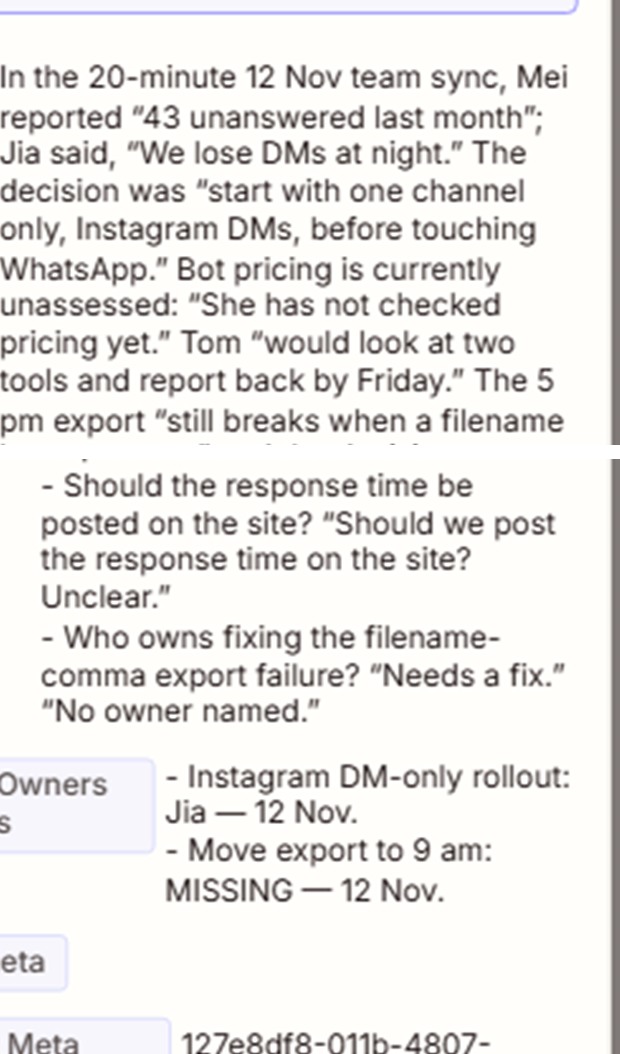
Should you upgrade to Plus or Pro?
The honest checklist, not a sales pitch. On the free tier you can still chat and even get simple scripts, but the heavier extras (Deep Research, Codex, and, currently, building new Custom GPTs) are locked behind paid plans, and usage caps on the paid tiers themselves vary by level. Upgrade signals: you're hitting message limits several times a week, you actually use Deep Research for real decisions, or the free model keeps slowing down at peak hours. Plans and prices change often, so confirm what's available on your account on the official site before paying.
Tonight, just pick one
You don't need to learn all four tonight. Pick the one that matches a problem you already have: a buying decision you've been putting off? Try Deep Research with the SUV prompt. A task you repeat every week? Turn it into instructions and save them as a Custom GPT. A folder full of photos? Ask for the compression script. Do it once, watch it work, and the rest of these moves will start to feel obvious.
ChatGPT Sites: a shareable mini-site, built by describing it
ChatGPT Sites entered public beta for Plus, Pro and Workspace accounts. You describe what you want, ChatGPT builds an interactive page, you refine it in a private preview and then publish it behind a URL. People use it for dashboards, project trackers, launch calendars, prototypes, internal portals and reports.
- Works in ChatGPT Work on the web, and in Work or Codex in the desktop app.
- You can attach files, data and links as constraints so the page matches your real content.
- Enterprise publishing is off by default and has to be enabled by an admin.
- Start a new Site in ChatGPT Work or the desktop app.
- Describe the page with a concrete example, such as a dashboard that tracks this month's freelance invoices, and attach what you already have.
- Review the private preview, ask for changes to colour, sections or wording, then publish and share the link.
This is the one advanced feature here that produces something you can hand to someone who does not use ChatGPT at all, which is why it is worth trying at least once.
Official Websites (Avoid Phishing)
Fake and phishing sites often rank high in search results. Only use the official URLs below.
AI Chatbots & Assistants
- ChatGPTchatgpt.com
AI Search
- Exaexa.ai
Productivity
- Makemake.com