

每个月都有一件重复的事:手机里三十张收据截图,邮箱里十几张 PDF 发票,会计要按月分好、最后给个总数。我一般改文件名字改到烦,然后全部丢进一个叫「乱七八糟」的文件夹。skill 就是专门治这种活的,写一套的时间比手动改一个月还短。
说白了,skill 是什么
一个 skill 就是一个文件夹,里面放一份 Markdown 文件。文件夹名字就是你要敲的命令,文件名固定叫 SKILL.md,内容分两截:开头几行 YAML 写清楚这个 skill 干什么用,下面写具体怎么做。没有插件格式,不用填 JSON,也没有构建步骤。
这个格式是 Anthropic 在 2025 年 10 月推出来的。之后 OpenAI 的文档让开发者「用 agent skills 扩展 ChatGPT 和 Codex」,Google 从 2026 年 10 月 5 日起在 Workspace 铺开 Skills,10 月 13 日进 Gemini app。所以 skill 这个词才会到处出现在搜索框里。
平时聊天,只有描述那一行会被读进上下文。正文等你真用到这个 skill 才加载,脚本和参考文件要等指令指过去才读。Anthropic 管这叫渐进式披露。实际好处是:你可以把一份很细的清单放在硬盘上,普通对话几乎不为此付代价。
文件放哪
| 位置 | 路径 | 谁能用 |
|---|---|---|
| 个人 | ~/.claude/skills/<名字>/SKILL.md | 这台机器上的所有项目 |
| 项目 | .claude/skills/<名字>/SKILL.md | 这个仓库里干活的所有人 |
| 插件 | <plugin>/skills/<名字>/SKILL.md | 装了插件的环境 |
第一个 skill 放个人目录就够了。建文件夹,把 SKILL.md 放进去;如果文件是打开会话之后才建的,重启一次会话。之后你敲 /receipt-sorter 手动调用,或者直接用大白话描述这件活,让它按描述自己认领。
做一个发票整理工具
任务要收窄:给一个装满收据的文件夹,文件名是手机或银行 App 随手起的;按年月分好,重命名成「日期_商家_金额」,再写一张会计能直接打开的 CSV。解析文件名很枯燥,正适合交给 skill:指令负责判断,脚本负责干活。
SKILL.md 全文
存成 ~/.claude/skills/receipt-sorter/SKILL.md
---
name: receipt-sorter
description: Sorts a folder of receipt photos and PDFs into year/month folders and writes an index.csv. Use when the user says their receipts are a mess, asks to tidy claim/reimbursement photos, or wants a spending index before filing taxes.
when_to_use: Trigger phrases such as "sort my receipts", "tidy up my invoices", "I need a claim sheet", "group these receipts by month".
allowed-tools: Bash(python ${CLAUDE_SKILL_DIR}/scripts/sort_receipts.py *)
---

# Receipt sorter

## What this does

Turns `receipts/` full of names like `IMG_4412.jpg` into:

```
sorted/
  2026/
    10/
      2026-10-03_grab-ride_12.40.jpg
```

and writes `sorted/index.csv` with one row per receipt.

## How to run it

1. Ask the user for the folder that holds the receipts. If they do not name one, use `receipts/` in the current directory.
2. Preview first. This changes nothing on disk:

   `python ${CLAUDE_SKILL_DIR}/scripts/sort_receipts.py <folder>`

3. Show the preview table to the user. If they say go ahead, run it again with `--apply`.
4. Report how many files moved and where `index.csv` landed.

## Rules the script follows

- Date comes from the filename when it looks like `2026-10-03`. Otherwise it falls back to the file's modified time.
- Merchant is the words left after removing the date, the amount and camera noise such as `IMG_` or `screenshot`.
- Amount is the last number with a decimal point.
- Files are copied, not deleted. The original folder stays untouched.

## Do not

- Do not delete originals to "clean up" before the user confirms the index looks right.
- Do not guess a merchant when the filename has none; write `unknown` instead.scripts/sort_receipts.py,完整脚本
和 SKILL.md 放同级,装进 scripts 文件夹
# -*- coding: utf-8 -*-
"""Sort receipts into YYYY/MM folders and write index.csv.

Usage:
    python sort_receipts.py <folder>          # preview only
    python sort_receipts.py <folder> --apply   # copy + write index
"""
import csv
import io
import os
import re
import shutil
import sys
from datetime import datetime

DATE_RE = re.compile(r"(20\d{2})[-_\.](\d{2})[-_\.](\d{2})")
AMOUNT_RE = re.compile(r"(\d+\.\d{1,2})")
NOISE = ("img_", "image", "screenshot", "photo", "scan", "whatsapp")
EXTS = {".jpg", ".jpeg", ".png", ".pdf", ".heic", ".webp"}


def parse(name, mtime):
    stem = os.path.splitext(name)[0]
    m = DATE_RE.search(stem)
    if m:
        date = datetime(int(m.group(1)), int(m.group(2)), int(m.group(3)))
        rest = stem[: m.start()] + " " + stem[m.end():]
    else:
        date = datetime.fromtimestamp(mtime)
        rest = stem

    amounts = AMOUNT_RE.findall(rest)
    amount = amounts[-1] if amounts else ""
    if amount:
        rest = rest.replace(amount, " ")

    words = re.sub(r"[^A-Za-z0-9]+", " ", rest).strip().lower()
    keep = [w for w in words.split()
            if w and not w.isdigit() and not any(n in w for n in NOISE)]
    merchant = "-".join(keep) or "unknown"
    return date, merchant, amount


def slug(text):
    return re.sub(r"[^a-z0-9\-]+", "-", text.lower()).strip("-")


def main():
    args = [a for a in sys.argv[1:] if not a.startswith("--")]
    apply = "--apply" in sys.argv
    folder = args[0] if args else "receipts"
    if not os.path.isdir(folder):
        print("No folder at", folder)
        return 1

    files = sorted(f for f in os.listdir(folder) if os.path.splitext(f)[1].lower() in EXTS)
    out_root = os.path.join(folder, "sorted")
    rows = []

    for name in files:
        path = os.path.join(folder, name)
        date, merchant, amount = parse(name, os.path.getmtime(path))
        ext = os.path.splitext(name)[1].lower()
        tail = f"{merchant}_{amount}" if amount else merchant
        new_name = f"{date:%Y-%m-%d}_{slug(tail)}{ext}"
        rel = os.path.join(f"{date:%Y}", f"{date:%m}", new_name)
        rows.append({
            "date": date.strftime("%Y-%m-%d"),
            "month": date.strftime("%Y-%m"),
            "merchant": merchant,
            "amount": amount,
            "original": name,
            "new_path": rel.replace("\\", "/"),
        })
        if apply:
            dest = os.path.join(out_root, rel)
            os.makedirs(os.path.dirname(dest), exist_ok=True)
            shutil.copy2(path, dest)

    print(f"{'MODE':<5} {'FILES':>5}  {folder}")
    print("apply" if apply else "dry", f"{len(rows):>5}")
    print()
    print(f"{'DATE':<12}{'MERCHANT':<18}{'AMOUNT':>8}  NEW PATH")
    print("-" * 78)
    for r in rows:
        print(f"{r['date']:<12}{r['merchant']:<18}{r['amount']:>8}  {r['new_path']}")

    total = sum(float(r["amount"]) for r in rows if r["amount"])
    print("-" * 78)
    print(f"total: {total:.2f} across {len(rows)} receipts")

    if apply:
        os.makedirs(out_root, exist_ok=True)
        idx = os.path.join(out_root, "index.csv")
        with io.open(idx, "w", encoding="utf-8", newline="") as f:
            w = csv.DictWriter(f, fieldnames=["date", "month", "merchant", "amount", "original", "new_path"])
            w.writeheader()
            w.writerows(rows)
        print()
        print("index written:", idx)
    return 0


if __name__ == "__main__":
sys.exit(main())我们实际跑的两条命令
先预览,再执行
python scripts/sort_receipts.py sample-receipts
python scripts/sort_receipts.py sample-receipts --apply真跑出来是什么样
我在本机把这个 skill 建好,拿自己下载文件夹里的 8 张收据试了一遍,名字有 IMG_4412.jpg,也有 screenshot 2026-11-18 parking 3.00.png。8 个文件,先预览,再 --apply。它建出 2026/10 和 2026/11,每个文件复制成能看懂的名字,同时写出 index.csv,合计 296.50。
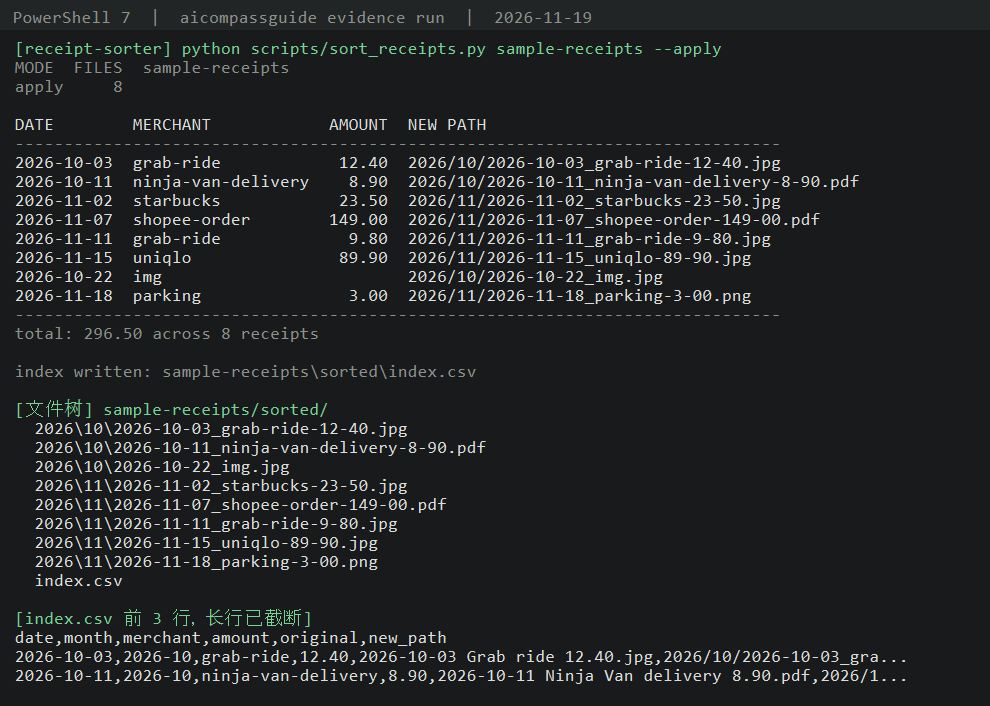
有一个文件正好暴露了规则太松。IMG_4412.jpg 名字里没日期也没商家,第一版把它标成 img-4412、金额留空。我把解析改严一点,砍掉纯数字和相机前缀,重跑一次,变成 img、金额空白。不完美,但它保留了自己的拍摄日期,落进了正确的月份。改 skill 就是改指令里的一句话、或者脚本里的一行,不用重新训练模型。
真正省事的是会计那一步。index.csv 六列:日期、月份、商家、金额、原文件名、新路径,Excel 或 Numbers 直接打开。上个月我光改文件名花了二十来分钟,这次不到一秒。
还有三个,十分钟能做完
| skill | 你怎么说 | 拿到什么 |
|---|---|---|
| weekly-report | 敲 /weekly-report,把零散笔记粘上 | 老板真正会看的那五段,每周顺序一致 |
| photo-rename | 指一个旅行照片文件夹 | 按日期和地点命名的文件,重复的单独列出 |
| inbox-triage | 贴一天邮件的标题 | 三堆:今天回、晚点看、不用管 |
这三个都只是一份 SKILL.md 加一小段指令。周报那个纯文字就够,另外两个各配一个小脚本,写法跟发票整理差不多。
哪里会翻车
- 描述里不写触发场景。Claude 就是靠那一行判断要不要加载这个 skill,写含糊等于没写。
- SKILL.md 超过 500 行。Anthropic 的建议是正文控制在 500 行以内,细节挪到单独的参考文件。
- 脚本有依赖但没声明。你本机能跑,同事那台一跑就报错。
- 会删会发会部署的动作没有闸门。这类流程要加 disable-model-invocation: true,只有你手动敲命令才执行。
- 下载陌生人的 skill 直接用。skill 能执行 shell 命令、能读你的文件,拿到别人给的 skill,先像看别人发来的脚本一样,把 SKILL.md 和里面的脚本读一遍。
- 把 API key 写进文件。SKILL.md 跟着文件夹一起分享,密钥也就跟着走了。
要不要花钱
写 skill 不花钱。用 skill 花 token:描述那一行每条消息都在上下文里,调起来还要加载正文和后续动作。60 行的 skill 比一份长参考文档便宜;读 2000 行 CSV 的 skill 比只读十行的贵。
需求侧的数字挺说明问题。FindSkill 引用的 DataForSEO 数据显示,「claude skills」在 2026 年 3 月美国月搜索量峰值 90,500,「agent skills」到 2026 年 8 月是每月 5,400,一年前只有 70。公开市场上,skills.sh 在 2026 年 1 月 16 日登记 2,179 个 skill,2 月 5 日已经到 40,285 个,中间只隔二十天。
先从你每周都要重复的那件活开始。如果你在 Gemini 里存过自定义的 Gem,同一套东西正在换名字搬过去,迁移那件事我们另一篇 Gemini Gems 的文章里写过。
官方入口(谨防钓鱼网站)
搜索结果里经常混有仿冒和钓鱼网站,请只通过以下官方网址访问正版工具。