
It's Sunday night. You need to email your boss tomorrow asking for a half-day off, but the draft you've written sounds stiff and weird. Or you've been juggling tabs for an hour trying to plan a weekend trip. Or your kid asks for homework help and you haven't touched this subject in twenty years. In every version of this story, ChatGPT — a free chat-based AI — can hand you a solid first draft in about ten minutes. This guide has zero concepts and zero jargon: we go straight from signing up to your first actually useful answer.
Step 1 — Open chatgpt.com and register
Go to your browser's address bar, type chatgpt.com, and hit enter. Signing up takes two minutes: either use your Google account with one click, or use your own email — type your email, set a password, click the verification link in your mailbox, and tick the terms the page asks for. If at any point you're asked for a phone number or hit a region-related message, just follow what the page itself says; verification rules change by region and over time, so treat the official site as the source of truth. No need to panic, and no need to go hunting for outdated tutorials.
Step 2 — A ten-second tour of the screen
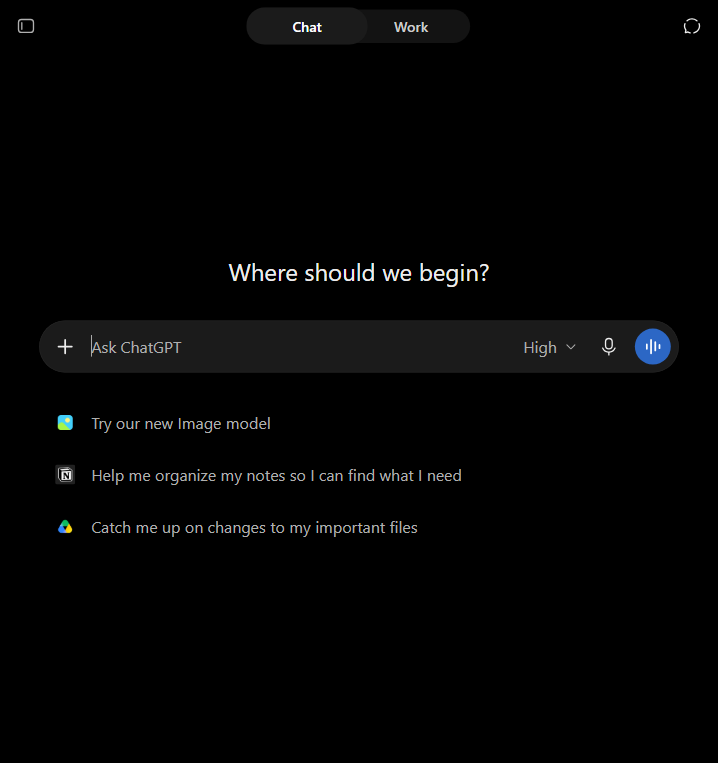
After logging in, the page looks almost embarrassingly empty — that's normal. In the middle is one big input box: that's where you type. Near the top left is 'New chat' for starting a fresh topic. On the left side is your history list: every conversation you've had is kept there, and you can reopen any of them and keep going. Close to the input box there's usually a model selector dropdown; on the free tier, a default model is already chosen for you. Beginners don't need to wrestle with version numbers — just leave it on default.

Step 3 — Send your first prompt
A 'prompt' is just a fancy word for whatever you type into the box. Describe your annoying little problem in plain words — the way you'd explain it to a friend — and press enter. Don't polish it. If you're stuck on that leave email, just type 'Help me write a leave email.' You'll get a usable but generic template back. That's fine — now we upgrade it with three copy-paste templates below.
Role: you are a polite office worker writing to your manager. Task: write a half-day leave email. Requirements: polite, under 100 words, mention that urgent tasks are covered. Output format: subject line first, then the body as plain text.
Role: you are a patient travel planner. Task: plan a one-day trip for two people who like local food, not museums. Requirements: at most three food stops, include travel time between stops, keep the pace relaxed. Output format: a table with time, place, and what to do.
Role: you are a tutor explaining to a ten-year-old. Task: explain why the sky is blue. Requirements: no big words, one everyday analogy, end with one fun fact. Output format: two short paragraphs.
The trick that turns flat answers into good ones
Compare: 'Help me write an email' gives a generic draft, because the AI is guessing your situation. Instead, type: 'Help me write an email — ask me two questions first, then draft it.' ChatGPT will immediately ask who the email is to and what it's about; once you answer, the draft suddenly becomes specific. That's the whole secret: don't expect the AI to read your mind — make it ask you. And whenever an answer feels too thin, just add: 'Make it more concrete, in bullet points.'
Five traps every beginner falls into
- Your question is too vague — 'write something good' tells the AI nothing at all
- You dump five different tasks into one message — it does none of them well
- You quit after one weak answer instead of typing one follow-up
- You treat every answer as fact — it can sound perfectly confident and still be wrong, so always double-check numbers, names and links
- You paste sensitive stuff — ID numbers, passwords, private addresses — never do that into any chatbot
Free vs. paid: when does it actually matter?
As of 2026, a free tier still exists on chatgpt.com, and for everyday jobs — drafting emails, summarizing articles, brainstorming ideas, explaining things — the free default model is plenty. The signals that you might want the paid plan (ChatGPT Plus): you get cut off by usage limits mid-task, you regularly need image generation, file uploads or up-to-date web results, or your colleagues are clearly working faster than you. Pricing and benefits change often — check what the official page shows after you log in, and don't trust old screenshots online.

Your ten minutes are up — what next?
Look: ten minutes ago you had no account. Now you've sent a prompt and got something you can actually use. What you just practiced — being specific, letting it ask, following up — is most of what people call 'prompt skills'. For your next step, pick one real task at work: something you've been avoiding writing, and run it through the same loop. That's how a free tool goes from a novelty to the thing that quietly saves you thirty minutes every day.
Official Websites (Avoid Phishing)
Fake and phishing sites often rank high in search results. Only use the official URLs below.
AI Chatbots & Assistants
- ChatGPTchatgpt.com
Productivity
- Makemake.com